
Vitepress卡片链接组件
提示
该卡片链接更适用于Vitepress单独的MD页面 因为需要用到frontmatter里的layout的home布局才可以完美显示 如果在默认的文章中使用的话 可能会出现显示异常的现象
效果
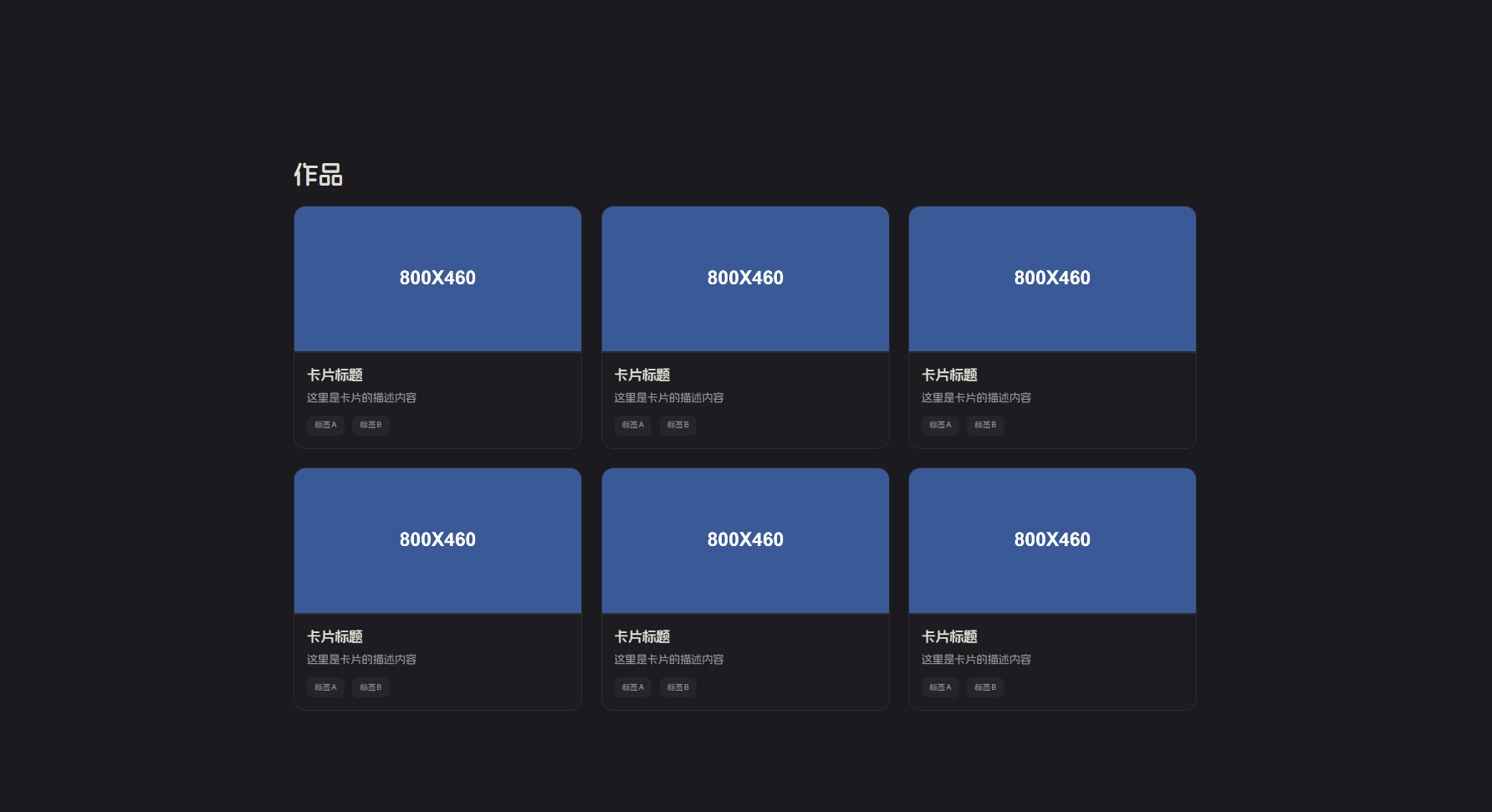
教程
首先在我们项目的theme文件夹下创建一个components文件夹,接着创建一个名为CardLayout.vue的文件粘贴以下代码
Vue
<template>
    <div class="card-container">
        <div v-for="(card, index) in cards" :key="index" class="card">
            <a :href="card.link" class="card-link" target="_blank" rel="noopener noreferrer">
                <div class="card-image">
                    <img :src="card.image" :alt="card.title">
                </div>
                <div class="card-content">
                    <h3 class="card-title">{{ card.title }}</h3>
                    <p class="card-description">{{ card.description }}</p>
                    <div class="card-tags">
                        <span v-for="(tag, tagIndex) in card.tags" :key="tagIndex" class="tag">{{ tag }}</span>
                    </div>
                </div>
            </a>
        </div>
    </div>
</template>

<script setup>
const props = defineProps({
    cards: {
        type: Array,
        required: true,
        default: () => []
    }
})
</script>

<style scoped>
.dark {
    --vp-extra-border: #80808025 !important;
    --vp-extra-border-hover: #80808040 !important;
}

:root {
    --vp-extra-border: #80808020;
    --vp-extra-border-hover: #80808035;
}

.card-container {
    display: grid;
    grid-template-columns: repeat(3, 1fr);
    gap: 24px;
    width: 100%;
    margin: 20px 0;
}

.card {
    width: 100%;
    height: 310px;
    display: flex;
    flex-direction: column;
    border-radius: 15px;
    overflow: hidden;
    transition: all 0.5s cubic-bezier(0.25, 0.1, 0.25, 1.5);
    transform: scale(1);
    border: 1px solid var(--vp-extra-border) !important;
}

.card-link {
    display: flex;
    flex-direction: column;
    height: 100%;
    text-decoration: none;
    color: inherit;
}

.card:hover {
    transform: scale(1.02);
    background: #80808005 !important;
    backdrop-filter: blur(25px) !important;
    border: 1px solid var(--vp-extra-border-hover) !important;
    transition: all 0.3s cubic-bezier(0.68, -0.55, 0.265, 1.55);
}

.card-image {
    height: 200px;
    overflow: hidden;

}

.card-image img {
    width: 100%;
    height: 100%;
    object-fit: cover;
    transition: transform 0.3s ease;
}

.card-content {
    flex: 1;
    padding: 16px;
    display: flex;
    border-radius: 0 0 15px 15px;
    flex-direction: column;
    background: #80808005 !important;
    backdrop-filter: blur(25px) !important;
}

.card-title {
    font-size: 18px;
    font-weight: 600;
    margin: 0 0 5px 0;
    color: var(--vp-c-text-1);
    line-height: 1.4;
}

.card-description {
    font-size: 14px;
    color: var(--vp-c-text-2);
    margin: 0 0 12px 0;
    line-height: 1.5;
    flex-grow: 1;
    overflow: hidden;
    display: -webkit-box;
    -webkit-box-orient: vertical;
    max-height: 4.5em;
    overflow: hidden;
    position: relative;
}

.card-tags {
    display: flex;
    flex-wrap: wrap;
    gap: 10px;
}

.tag {
    background: #80808010 !important;
    backdrop-filter: blur(25px) !important;
    color: var(--vp-c-text-2);
    padding: 1px 10px;
    border-radius: 8px;
    font-size: 10px;
}

/* 响应式设计 */
@media (max-width: 1024px) {
    .card-container {
        grid-template-columns: repeat(2, 1fr);
    }
}

@media (max-width: 640px) {
    .card-container {
        grid-template-columns: 1fr;
    }

    .card {
        height: auto;
        max-width: 400px;
        margin: 0 auto;
    }

    .card-image {
        height: 180px;
    }
}
</style>接着在index.ts文件里注册组件
Ts
import DefaultTheme from 'vitepress/theme'
import CardLayout from './components/CardLayout.vue'

export default {
  ...DefaultTheme,
  enhanceApp({ app }) {
    app.component('CardLayout', CardLayout)
  }
}接着创建一个.md文件粘贴以下代码就可以使用了 需要注意frontmatter部分要一致
Markdown
---
title: 动态
aside: false
sidebar: false
layout: home
---

<br/>

# 动态

<CardLayout :cards="[
  {
    image: './/img/Test.jpg',
    title: '卡片标题',
    description: '这里是卡片的描述内容',
    tags: ['标签A', '标签B'],
    link: '/essay/card'
  },
  {
    image: './/img/Test.jpg',
    title: '卡片标题',
    description: '这里是卡片的描述内容',
    tags: ['标签A', '标签B'],
    link: '#'
  },
  {
    image: './/img/Test.jpg',
    title: '卡片标题',
    description: '这里是卡片的描述内容',
    tags: ['标签A', '标签B'],
    link: '#'
  },
  {
    image: './/img/Test.jpg',
    title: '卡片标题',
    description: '这里是卡片的描述内容',
    tags: ['标签A', '标签B'],
    link: '#'
  },
  {
    image: './/img/Test.jpg',
    title: '卡片标题',
    description: '这里是卡片的描述内容',
    tags: ['标签A', '标签B'],
    link: '#'
  },
  {
    image: './/img/Test.jpg',
    title: '卡片标题',
    description: '这里是卡片的描述内容',
    tags: ['标签A', '标签B'],
    link: '#'
  }
]" />附件
占位图素材下载(右击保存)